You handle the money
Accounting
Invoices, the shared-cost split, what rent is owed, the subscriptions, and the figures on top of all of it.
Getting in
The building manager creates your login.
What your screen looks like
These are real screens, photographed from the running product — not drawings.
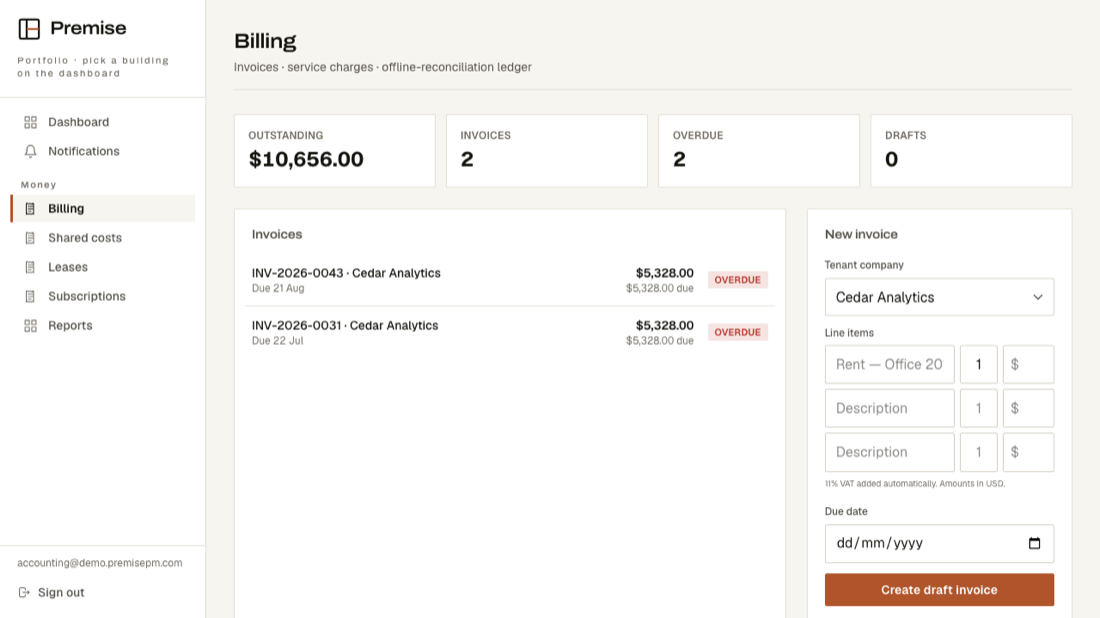
What is on your menu
- DashboardGoes straight to Billing — what is outstanding is your first screen.
- NotificationsAnything that needs you.
- BillingIssue invoices, record payments, see what is overdue.
- Shared costsThe building's running costs and how they are split across tenants.
- LeasesWhat each company pays, and until when.
- SubscriptionsAnything charged on a repeating basis.
- ReportsThe figures, per building and per period.
What you cannot see
The maintenance queue, visitors, deliveries and the staff list. You can see what a company owes without seeing who works there.