You fix what is broken
Maintenance
Your queue, the equipment it refers to, and the contractors you assign work to. Nothing else — no rent, no leases, no tenant paperwork.
Getting in
The building manager creates your login and you set your own password from the email.
What your screen looks like
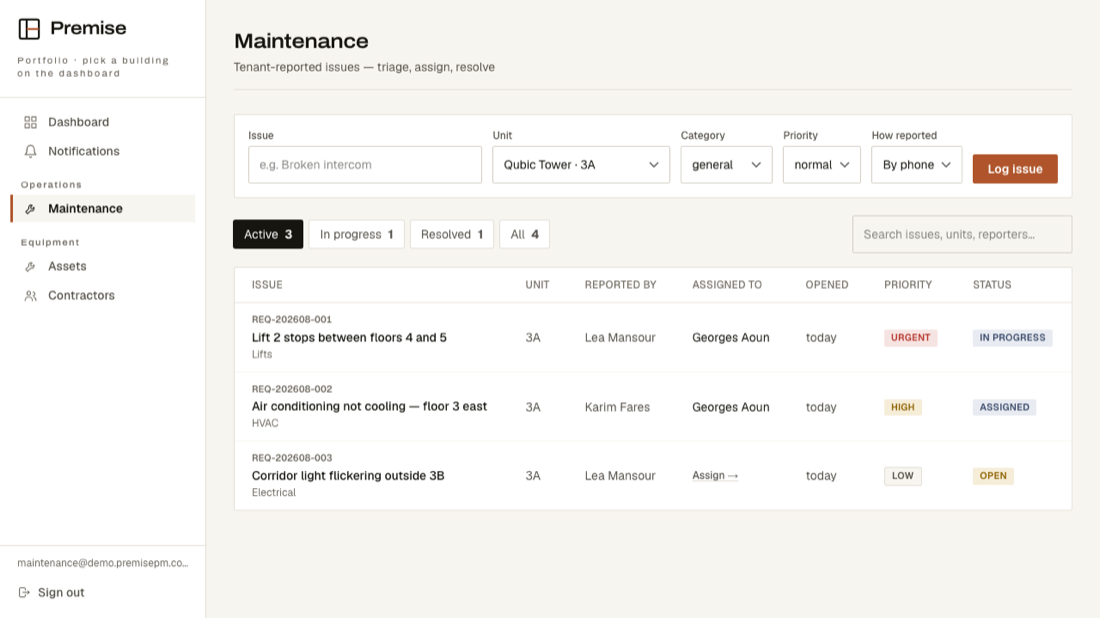
These are real screens, photographed from the running product — not drawings.
What is on your menu
- DashboardGoes straight to Maintenance — your queue is your first screen.
- NotificationsAnything that needs you.
- MaintenanceEvery reported fault, who has it, and where it stands.
- AssetsThe equipment you look after, and its service history.
- ContractorsWho you call out, and what they have been assigned.
What you cannot see
Invoices, rent, leases, insurance certificates, the tenant register and the staff list. Not hidden from your menu and reachable another way — your account genuinely cannot read them.